Screenshot your Pull Requests
DemoBot produces a visual demo of code changes in pull request comments.
Verify changes without ever having to checkout branches locally or click around preview deployments.
Works with all modern web stacks
Code review shows you the diff — not the UI.
To actually see a visual change today, you check out the branch and run it, or dig through a preview deploy to find what moved. Most reviewers don't — so UI changes get approved sight-unseen. DemoBot runs the branch for you and posts screenshots of exactly what changed, right in the PR.
Install & pick repos
Add the GitHub App and choose the repositories you want covered. DemoBot detects your framework.
Open a pull request
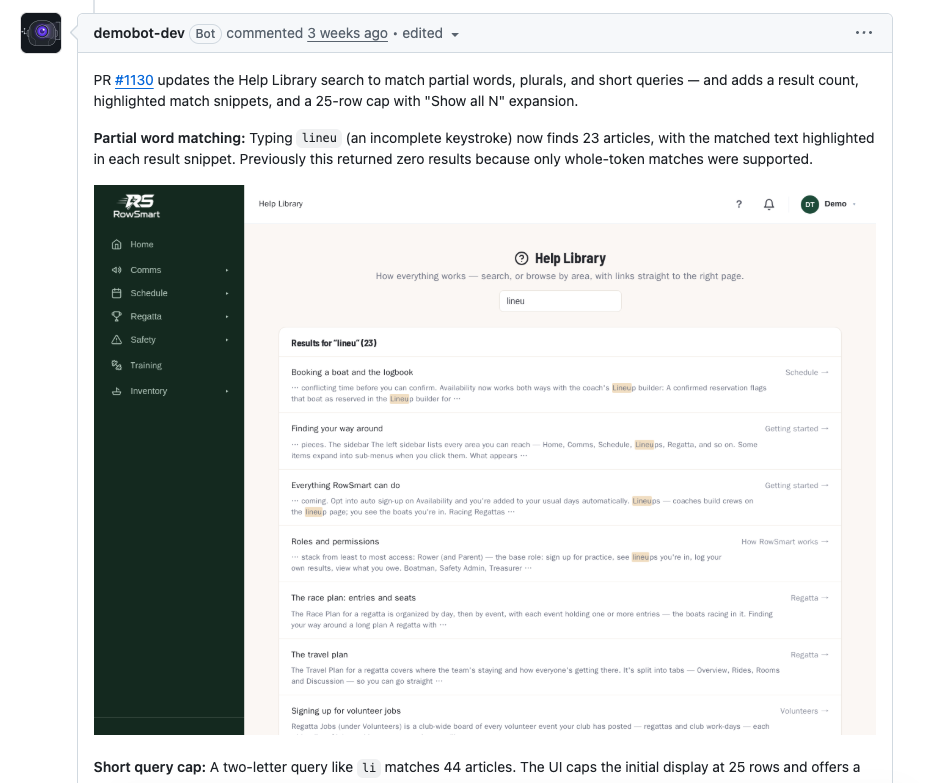
DemoBot spins up your app from the branch, reads the diff, and captures real screenshots of the views your changes touch.
Review in the PR
The screenshots and demo summary post as an inline PR comment. Everyone reviewing sees the change where they already work.
Everything a review needs, on autopilot
One agent runs the app, captures the screens, and explains the change.
Zero config
DemoBot detects your framework and infers the build and run steps. Add a test login or secrets when your app needs them.
Real screenshots, not guesses
DemoBot runs your actual branch and photographs the real UI. These are true screenshots of your running app, never AI generated mock pages.
Demo Summary
Plain-English summary of what changed and why, written from the diff and the captured screens.
Right in the pull request
Screenshots and the summary post as an inline PR comment.
Framework-agnostic
If it builds and runs, DemoBot can capture it: Next, Vite, Remix, Nuxt, SvelteKit, Astro, and more.
Priced by usage
Automatically get a demo when a pull request is opened, subsequent demos on the same PR are manually triggered to conserve your credits
Hobby
First month freeFor solo devs and side projects.
✓ Start free for your first month.
Get startedEnterprise
Negotiated demo limits, SSO & audit logs, on-prem runners, and SLA support for orgs at scale.
Why we built DemoBot
AI has dramatically accelerated how fast engineering teams ship. We've lived it first-hand — and watched our own days shift from writing code to reviewing an ever-growing stream of it. Producing changes stopped being the hard part; verifying them became it. A diff tells you which lines moved, but not whether the product actually looks and behaves the way it should.
We built DemoBot so we could see the real result of a change instead of reconstructing it in our heads from the code. It runs the branch, captures what actually changed on screen, and posts it right in the pull request — so reviewing the customer experience is as easy as reading the diff.
DemoBot is built on top of our agentic AI platform, Gibon.
Who we are
DemoBot was founded by Jeremy Roberts and Russell Palmiter. We've been friends and colleagues for decades, working across the tech industry in a wide range of roles. We previously founded and exited an eCommerce startup, RetailKit. DemoBot is the tool we kept wishing we had every time we opened a pull request.


Questions
How is this different from deploy previews?+
Preview deploys (such as Vercel's) give you a full deployment of the change — but you still have to open it and click around to find what's different. DemoBot shows those changes directly in the PR as screenshots, so you can review at a glance without spending time navigating the preview environment.
Do I need to change my codebase?+
Usually not — DemoBot detects your framework and infers the build and run steps. A few cases need a hand from you: apps that gate most functionality behind login (provide test-user credentials), apps that need secrets not checked into the repo (add them to DemoBot's secrets manager), and apps that depend on local infrastructure not documented in the repo (e.g. a local Postgres), which may need a little config or documentation so DemoBot knows how to run them.
How does it handle databases and secrets?+
That's up to your app. DemoBot runs your code as-is, so it talks to whatever databases and services your branch is configured to use — we don't provision or dictate your data layer. You supply any secrets or connection details through DemoBot's secrets manager.
Is my source code safe?+
Yes. DemoBot runs in AWS Lambda MicroVMs. VMs are snapshotted to support continuation; snapshots are saved in secure S3 storage and expired after 30 days.